


The scenario is as follows: you have two reports with the cross-report drillthrough option enabled in the Power BI service. This feature works perfectly for you and some users as they navigate through the published report. However, for other users, when they right-click on a visual, the drillthrough option does not appear in the context menu. You have already reviewed all permissions, and these users have access to both reports, but the option still doesn’t show up, and you’re not sure what to do next. Don’t worry, in this article, we will explain how to solve this issue!
Table of contents
How to fix
I was providing consultancy to a client and came across a similar case. After a few hours of research and reading Microsoft documentation, I stumbled upon the following excerpt:

Initially, I thought this limitation would only apply to link sharing. So, I tested it with direct sharing, but the drillthrough option still didn’t appear.
My discovery was that Microsoft considers both link sharing and direct access sharing as individual shares. Consequently, cross-report drillthrough will NOT work in these cases.
Okay, we’ve figured out why it’s not working, but how do we provide a solution for this use case?
There are two solutions:
Solution 1) Grant viewer permission to the user at the Workspace level.
By assigning the user a viewer profile at the Workspace level, they will be able to perform drillthrough between reports within the same Workspace. However, the downside of this option is that the user will be able to view all artifacts within that Workspace. This may not be secure in many cases, as there could be artifacts that the user should not be able to see, such as reports in development or confidential dataflows/reports.
To provide this access, follow these steps:
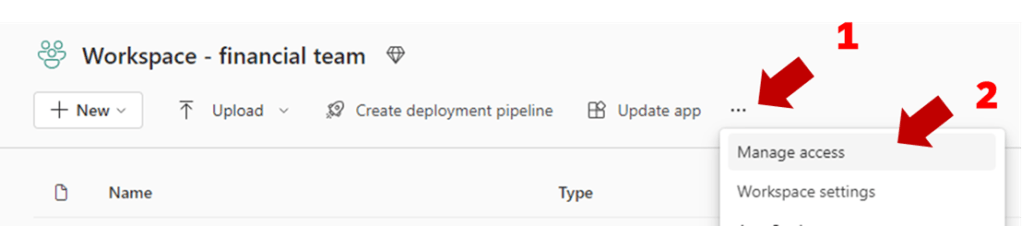
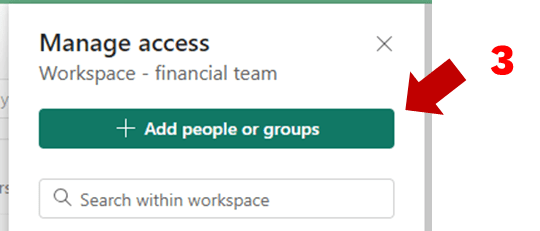
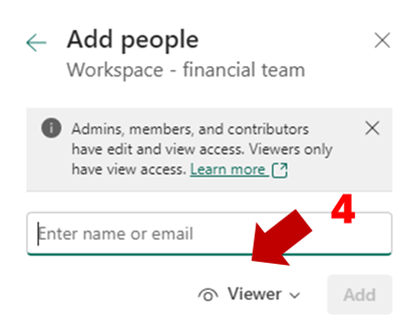
Add the user’s email and provide the viewer profile.
Solution 2) Publish both reports in the Workspace App
When we add both reports to the App, the drillthrough option appears for users. The advantage of this solution is that we don’t need to share all the artifacts of the Workspace with the user. With the new App audiences feature, we can create multiple views of the App according to the audience, allowing us to use the same app for various use cases. I particularly recommend this scenario.
 Power BI Point
Leave a comment